
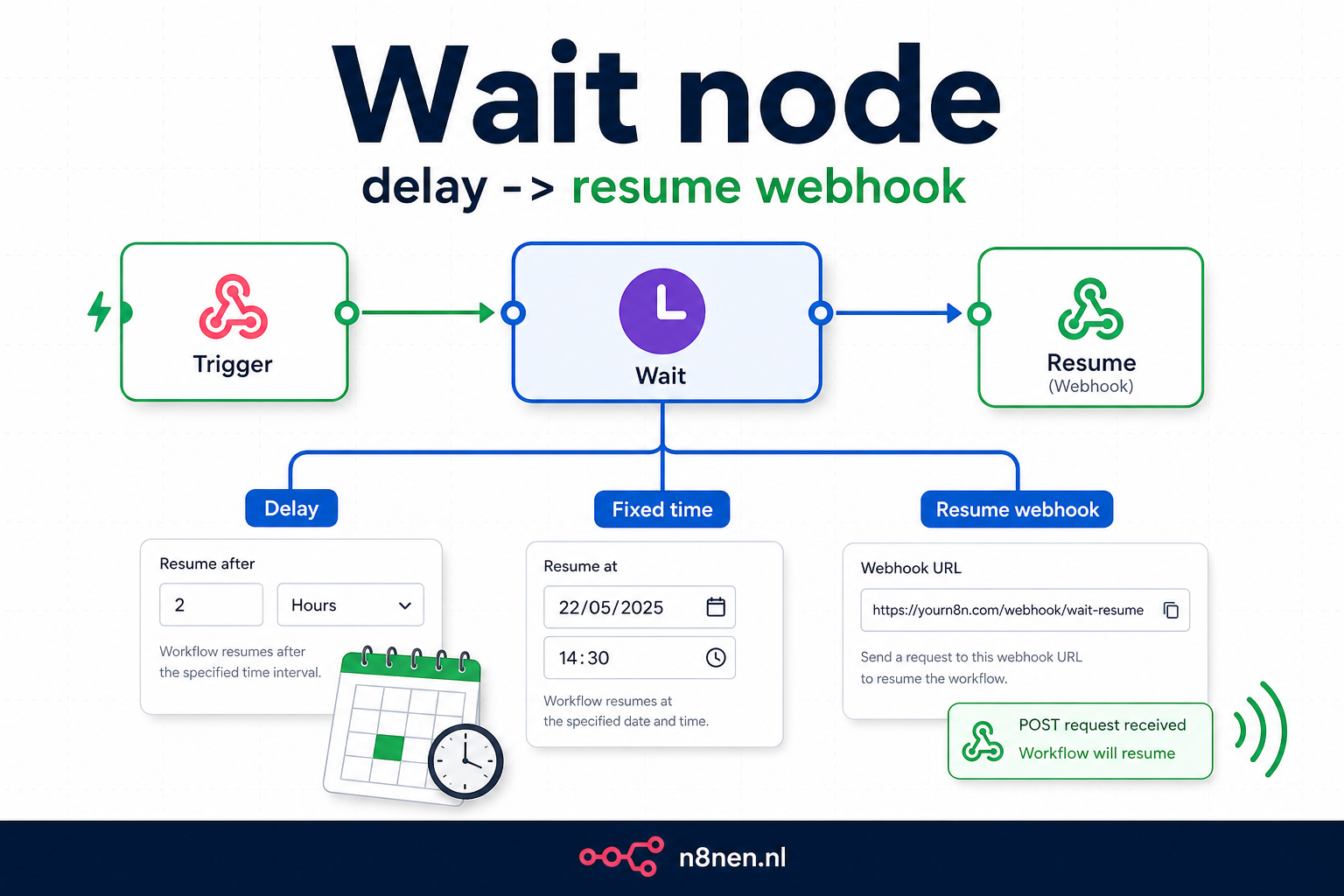
n8n Wait node docs: welke optie kies je?
Kies After time interval voor korte pauzes tussen API-calls, At specified time voor één vast moment en On webhook call als een extern systeem dezelfde execution moet hervatten. Wil je elke dag een nieuwe run starten, gebruik dan geen Wait node maar een Schedule Trigger.
Productieregel: zet een limiet op lange waits, bewaar alleen de data die je later nodig hebt en stuur bij externe approvals direct een bevestiging terug in plaats van het webhook-request open te houden.
Kies Wait alleen als de execution moet blijven bestaan
De fout die ik het vaakst zie: Wait gebruiken als simpele cronjob. Dat werkt, maar het maakt je workflow onnodig kwetsbaar. Kies zo:
- Wait node: dezelfde execution moet later verder, bijvoorbeeld na een approval of callback.
- Schedule Trigger: je wilt elke ochtend, elk uur of elke maandag een nieuwe run starten.
- Webhook node: een extern systeem bepaalt wanneer een nieuwe workflow begint.
Twijfel je? Als je de oude input later nog nodig hebt, is Wait logisch. Als je alleen een tijdschema nodig hebt, gebruik Schedule Trigger.
De Wait node is de pauzeknop voor workflows die later met dezelfde execution-data verder moeten. Dat klinkt simpel, maar de keuze tussen time interval, specified time, resume webhook en form submission bepaalt of je workflow betrouwbaar blijft of ongemerkt blijft hangen.
In deze gids krijg je eerst de juiste keuzehulp, daarna pas de details. Zo zie je snel wanneer de Wait node de juiste oplossing is, wanneer een Webhook node beter past en wanneer je timing beter oplost met een DateTime-berekening of aparte trigger.
Wanneer gebruik je de Wait node?
| Situatie | Beste keuze | Waarom |
|---|---|---|
| Na elke API-call twee seconden pauzeren | Wait: After Time Interval | Je houdt dezelfde batch-execution vast en voorkomt rate-limit fouten. |
| Wachten tot een klant, manager of betaalsysteem reageert | Wait: On Webhook Call of On Form Submitted | De workflow krijgt een unieke resume URL en gaat pas verder na de externe actie. |
| Elke dag om 07:00 een nieuwe workflow starten | Schedule Trigger | Je wilt geen oude execution pauzeren, maar een nieuwe run starten. |
| Een externe app stuurt een nieuw event naar n8n | Webhook node | Dit is een nieuw startpunt, geen hervatting van een bestaande execution. |
Wat is de Wait Node?
De Wait node is een flow control node die je workflow tijdelijk pauzeert en later weer hervat op basis van specifieke condities. Tijdens de pauze wordt de execution data veilig opgeslagen in de database, waarna de workflow precies verder gaat waar hij was gebleven wanneer de resume conditie wordt vervuld.
Belangrijke kenmerken:
- State persistence: Data wordt veilig opgeslagen tijdens pauze
- Lange wachttijden: Kan uren, dagen of zelfs weken wachten
- Meerdere hervatopties: tijd, webhook, formulier of vast moment
- Resourcevriendelijk: Gebruikt geen resources tijdens wachten
- Betrouwbaar: Hervat zelfs na server restart
De 4 manieren om een Wait node te hervatten
1. After Time Interval ⏱️
De meest gebruikte modus - wacht voor een specifieke tijdsduur voordat de workflow verder gaat.
| Time Unit | Max Value | Use Case |
|---|---|---|
| Seconds | Unlimited | API rate limiting |
| Minutes | Unlimited | Batch processing intervals |
| Hours | Unlimited | Daily reports delay |
| Days | Unlimited | Follow-up reminders |
// Configuratie voorbeeld
{
  "resumeOn": "After Time Interval",
  "amount": 5,
  "unit": "minutes"
}
2. At Specified Time 📅
Wacht tot een specifiek tijdstip voordat de workflow verder gaat. Perfect voor scheduled operations.
// Wacht tot morgen 9:00 AM
{
  "resumeOn": "At Specified Time",
  "date": "2025-01-04",
  "time": "09:00:00",
  "timezone": "Europe/Amsterdam"
}
Timezone Tips:
- Gebruik altijd explicit timezone settings voor betrouwbaarheid
- Amsterdam:
Europe/Amsterdam - België:
Europe/Brussels - UTC voor server-agnostic timing
3. On Webhook Call 🔗
De krachtigste resume optie - wacht tot een externe service een webhook aanroept.
// Webhook configuratie
{
  "resumeOn": "On Webhook Call",
  "webhookSuffix": "order-processed", // Optioneel
  "limit": {
    "enabled": true,
    "amount": 24,
    "unit": "hours"  // Max wait time
  }
}

// Resume URL wordt automatisch gegenereerd:
// https://your-n8n.com/webhook-waiting/abc123/order-processed
⚠️ Webhook Timeout Waarschuwing:
Bij lange waits moet je niet op dezelfde webhook-response blijven wachten. Op n8n Cloud kan een webhook-request falen als er binnen 100 seconden geen response komt; gebruik daarom een async pattern met een directe bevestiging en een aparte status- of resultaatwebhook.
4. On Form Submission 📝
Wacht tot een gebruiker een form invult. Ideaal voor approval workflows.
// Form configuratie
{
  "resumeOn": "On Form Submission",
  "formTitle": "Order Approval",
  "formDescription": "Please approve or reject this order",
  "formFields": [
    {
      "fieldLabel": "Decision",
      "fieldType": "dropdown",
      "requiredField": true,
      "fieldOptions": [
        "Approve",
        "Reject",
        "Request More Info"
      ]
    },
    {
      "fieldLabel": "Comments",
      "fieldType": "textarea",
      "requiredField": false
    }
  ]
}
Praktische Use Cases
Use Case 1: API Rate Limiting
Voorkom API rate limit errors door requests te throttlen:
// Rate limiting workflow pattern
{
  "nodes": [
    {
      "name": "Split In Batches",
      "type": "n8n-nodes-base.splitInBatches",
      "parameters": {
        "batchSize": 10  // 10 items per batch
      }
    },
    {
      "name": "Process Batch",
      "type": "n8n-nodes-base.httpRequest",
      "parameters": {
        "url": "https://api.example.com/process",
        "method": "POST"
      }
    },
    {
      "name": "Wait Between Batches",
      "type": "n8n-nodes-base.wait",
      "parameters": {
        "amount": 2,
        "unit": "seconds"  // Wait 2 seconds between batches
      }
    }
  ]
}
Use Case 2: Multi-Stage Approval Process
Use Case 3: Scheduled Email Follow-ups
// Email drip campaign met Wait nodes
const workflow = {
  "trigger": "User signs up",
  "sequence": [
    {
      "action": "Send welcome email",
      "immediate": true
    },
    {
      "wait": {
        "amount": 1,
        "unit": "days"
      }
    },
    {
      "action": "Send onboarding tips",
      "condition": "if not yet activated"
    },
    {
      "wait": {
        "amount": 3,
        "unit": "days"
      }
    },
    {
      "action": "Send case studies",
      "condition": "if engaged with previous emails"
    },
    {
      "wait": {
        "amount": 1,
        "unit": "weeks"
      }
    },
    {
      "action": "Send special offer",
      "condition": "if not yet converted"
    }
  ]
};
Use Case 4: Payment Processing Synchronization
// Payment webhook synchronization pattern
{
  "workflow": [
    {
      "node": "Create Payment",
      "action": "Send payment request to Mollie/Stripe",
      "output": "paymentId, checkoutUrl"
    },
    {
      "node": "Send to Customer",
      "action": "Email checkout URL to customer"
    },
    {
      "node": "Wait for Payment",
      "type": "wait",
      "config": {
        "resumeOn": "webhook",
        "webhookSuffix": "payment-{{paymentId}}",
        "maxWait": "30 minutes",
        "data": "Store order details"
      }
    },
    {
      "node": "Payment Received",
      "action": "Process order fulfillment",
      "condition": "if payment.status === 'paid'"
    }
  ]
}
Advanced Patterns & Techniques
Pattern 1: Cascading Waits met Fallbacks
// Multiple wait conditions met fallbacks
const cascadingWaitPattern = {
  "primary_wait": {
    "type": "webhook",
    "timeout": "2 hours",
    "suffix": "primary-response"
  },
  "if_timeout": {
    "secondary_wait": {
      "type": "time",
      "duration": "30 minutes"
    },
    "then": "Send reminder",
    "final_wait": {
      "type": "webhook",
      "timeout": "1 hour",
      "suffix": "reminder-response"
    }
  },
  "fallback": "Auto-reject after 3.5 hours total"
};
Pattern 2: Dynamic Wait Duration
// Bereken wait tijd dynamisch op basis van data
const calculateWaitTime = (priority, amount) => {
  let baseWait = 60; // Base wait in minuten

  // Adjust based on priority
  switch(priority) {
    case 'high':
      baseWait = 15;
      break;
    case 'medium':
      baseWait = 60;
      break;
    case 'low':
      baseWait = 240;
      break;
  }

  // Adjust based on amount
  if (amount > 10000) {
    baseWait = baseWait / 2; // Halve wait time for large orders
  }

  return {
    amount: baseWait,
    unit: 'minutes'
  };
};

// Gebruik in Set node voor Wait node
$json.waitConfig = calculateWaitTime($json.priority, $json.orderAmount);
Pattern 3: Parallel Waiting met Merge
Best Practices & Optimalisatie
Performance Consideraties
| Aspect | Best Practice | Reden |
|---|---|---|
| Maximale wachttijd | Altijd een limit instellen | Voorkom infinite waits |
| Webhook URLs | Gebruik unieke suffixes | Voorkom conflicts |
| Datagrootte | Minimaliseer tijdens wait | Database-efficiëntie |
| Foutafhandeling | Werk met fallbacks | Betrouwbaarheid |
Security Best Practices
Webhook security:
- Gebruik HTTPS: Altijd SSL/TLS voor webhook URLs
- Voeg authenticatie toe: Voeg tokens toe aan webhook calls
- Valideer payloads: Check data integrity
- Rate limiting: Bescherm tegen abuse
- Logging: Monitor alle webhook activity
Error Handling Strategies
// Robuuste error handling voor Wait nodes
const errorHandlingPattern = {
  "wait_config": {
    "primary": {
      "type": "webhook",
      "maxWait": "1 hour"
    },
    "on_timeout": {
      "action": "log_timeout",
      "notify": "admin@company.com",
      "fallback": "use_default_values"
    },
    "on_error": {
      "retry": {
        "attempts": 3,
        "delay": "5 minutes"
      },
      "final_fallback": "manual_intervention_required"
    }
  },
  "data_validation": {
    "before_wait": "validate_required_fields",
    "after_resume": "validate_response_data"
  }
};
Integratie met Andere Nodes
Wait + Split In Batches
Combineer Wait met Split In Batches voor rate-limited batch processing:
// Batch processing met delays
[
  Split In Batches (10 items)
  → Process Batch
  → Wait (2 seconds)
  → Loop back if more batches
]
Wait + IF Node
Gebruik IF nodes voor conditional waiting:
// Conditional wait based on data
IF (amount > 1000)
  → Wait (manager approval)
ELSE
  → Process immediately
Wait + Merge Node
Combineer met Merge node voor parallel wait operations:
// Multiple wait paths merged
Path 1: Wait for payment → Merge
Path 2: Wait for inventory → Merge
Path 3: Wait timeout (30 min) → Merge
→ First to complete continues workflow
Troubleshooting Guide
Veelvoorkomende Problemen
| Probleem | Oorzaak | Oplossing |
|---|---|---|
| Webhook timeout op lange responses | Webhook wacht te lang op response | Stuur direct een response en laat resultaat ophalen via aparte webhook |
| Resume URL changes | Nieuwe execution | Send URL in same execution |
| Wait blijft hangen | Geen limit ingesteld | Altijd max wait time instellen |
| Data loss tijdens wait | Te grote payload | Store in database, niet in workflow |
| Webhook not received | Wrong URL/suffix | Verify URL format en suffix |
Debug Tips
Debugging Strategieën:
- Log alle resume URLs voor tracking
- Test webhooks met tools zoals Postman eerst
- Monitor execution logs tijdens wait periods
- Gebruik korte wait times tijdens development
- Implement notification nodes voor wait timeouts
Real-World Implementatie Voorbeelden
Voorbeeld 1: Order Fulfillment Workflow
// Complete order fulfillment met waits
const orderFulfillmentWorkflow = {
  "trigger": "New order webhook",
  "steps": [
    {
      "name": "Validate Order",
      "action": "Check inventory, pricing, customer"
    },
    {
      "name": "Send Payment Link",
      "action": "Create Mollie payment, email customer"
    },
    {
      "name": "Wait for Payment",
      "type": "wait",
      "config": {
        "mode": "webhook",
        "suffix": "payment-{{orderId}}",
        "maxWait": "24 hours"
      }
    },
    {
      "name": "Process Payment Result",
      "condition": "Check if paid"
    },
    {
      "name": "Reserve Inventory",
      "action": "Update stock levels"
    },
    {
      "name": "Wait for Shipping Label",
      "type": "wait",
      "config": {
        "mode": "webhook",
        "suffix": "shipping-{{orderId}}",
        "maxWait": "2 hours"
      }
    },
    {
      "name": "Send Tracking Info",
      "action": "Email customer with tracking"
    },
    {
      "name": "Wait 7 Days",
      "type": "wait",
      "config": {
        "mode": "time",
        "duration": "7 days"
      }
    },
    {
      "name": "Request Review",
      "action": "Send review request email"
    }
  ]
};
Voorbeeld 2: Document Approval Chain
// Multi-level document approval
const approvalChain = {
  "levels": [
    {
      "level": 1,
      "approver": "direct_manager",
      "wait": {
        "type": "form",
        "timeout": "24 hours",
        "reminder_after": "12 hours"
      }
    },
    {
      "level": 2,
      "approver": "department_head",
      "condition": "if amount > 5000",
      "wait": {
        "type": "form",
        "timeout": "48 hours",
        "escalate_on_timeout": true
      }
    },
    {
      "level": 3,
      "approver": "cfo",
      "condition": "if amount > 25000",
      "wait": {
        "type": "form",
        "timeout": "72 hours",
        "auto_approve_on_timeout": false
      }
    }
  ],
  "on_all_approved": "Execute request",
  "on_any_rejected": "Notify requester and stop"
};
Conclusie en Next Steps
De Wait node is veel meer dan een simpele pause knop - het is een krachtige orchestration tool die je workflows intelligent en responsive maakt. Van API rate limiting tot complexe approval chains, de Wait node stelt je in staat om real-world business processes perfect te modelleren.
Key Takeaways
- 4 hervatopties: tijdsinterval, specifiek tijdstip, webhook of formulierreactie
- Webhook response limit: Houd lange processen async; n8n Cloud-webhooks kunnen na 100 seconden falen
- Stel altijd limieten in: Voorkom infinite waits met max duration
- Webhook security: Gebruik HTTPS en authenticatie voor webhooks
- State persistence: Data blijft veilig tijdens wait periods
- Combineer met andere nodes: Split In Batches, IF, Merge voor advanced patterns
- Monitor en log: Track alle wait operations voor debugging
Veelgestelde Vragen
Hoe lang kan een Wait node maximaal wachten?
Er is geen harde limiet - Wait nodes kunnen dagen, weken of zelfs maanden wachten. De praktische limiet wordt bepaald door je database retention policies.
Wat gebeurt er als de server restart tijdens een wait?
De wait state wordt opgeslagen in de database. Na een restart zal N8N automatisch alle actieve waits hervatten op het juiste moment.
Kan ik meerdere Wait nodes parallel gebruiken?
Ja! Gebruik split paths met meerdere Wait nodes en een Merge node om parallel te wachten op verschillende condities.
Hoe voorkom ik webhook timeout issues?
Voor lange waits gebruik je een async pattern: respond direct met een status en gebruik een aparte webhook of polling-route voor het resultaat.
Deze gids wordt regelmatig bijgewerkt met nieuwe features en patterns. Bookmark deze pagina voor de laatste Wait node best practices en voorbeelden.